 twinbfield

Software-defined radio and the idyllic beauty of the electromagnetic spectrum
by twinbfieldPermalink
Armed with a wire and a radio on a USB stick, you can connect into a global network of communication.
We take for granted the level of interconnectedness we share with the world. The Internet is no longer the source of inspiration it used to be. We've largely moved on from the era of design inspired by a global village-style utopia that dominated tech design in the late 90s and early 2000s, (including, for example, the Frutiger Aero design language that inspires this site's looks). Near-instantaneous connection on a global scale had become more of a monolithic presence, mirrored by the rise of social media platforms and tech giants like Meta, Google, and Apple and demonstrated in the more minimalist and functional design of the 2010s.
But have you ever stopped to think about the physical processes that enable that level of communication? All of the wireless technologies connecting us use radio signals. WiFi, Bluetooth, 5G phone signals, GPS - they are all just different patterns of frequencies occupying portions of the electromagnetic spectrum. If you want to explore the radio spectrum and open a vast network of communications, you can easily do it using something called a software-defined radio (SDR). These are USB receivers the size of a thumb drive that you connect to an antenna - you can get a complete kit for about $50. A software-defined radio can connect you with a near-instantaneous network of worldwide communication - free of charge, free from censorship, free from any platform.
I want to point out that some of the best signals worth accessing are from amateur radio hobbyists (AKA ham radio). Now, when someone says "ham radio", I immediately think of a bunch of old men sitting around microphones complaining about doctors appointments. And sure, there's some validity to that stereotype - listen in on a random conversation happening on the voice bands and more often than not they're talking about the weather, their health, or their equipment. But if you stay with me, I think you'll find that there's a lot more than the stereotype suggests with amateur radio. It's accessible, and it's worldwide. You don't need to be licensed in order to listen in (though you do need a license to transmit). Amateur transmissions can't be encrypted (though they can be encoded, e.g. with Morse code), so you can see anything your antenna can catch. Amateur radio gets a decent chunk of the highly-valued electromagnetic spectrum, and I seriously underestimated the variety of activity going on in the air.
First, then I'll give a brief overview of how you can set this up for yourself or even access someone else's setup via the Internet for free, and then I'll highlight some specific examples of what's out there.
The setup
Using someone else's radio
This is the simplest solution, and it's free. Many enthusiasts make their radios available to the Internet, and there's usually a web interface that will allow you to sweep different frequencies and decode different types of transmissions. I suggest looking on rx-tx.info/map-sdr-points, receiverbook.de, and websdr.org. They support different ranges of frequencies depending on the antenna - for long-distance communication, try the HF ("high frequency") band around 3-30 MHz. Local communications, broadcast FM radio and TV signals are in the VHF ("very high frequency") band around 30-300 MHz. Signals like GPS, WiFi, walkie-talkies, and other close-range radio services occur on the UHF ("ultra high frequency") band in 300-3000 MHz.
Setting up your own radio
You can order a software-defined radio dongle in a kit for about $50. I bought an RTL-SDR v4 from RTL-SDR, though I think this brand and model is becoming difficult to source in the US. If you buy a kit, it might come with a pair of rabbit-ear antennas. Usually, these are good for use within the VHF and UHF bands.
If you want to catch long-distance signals, you'll need an HF antenna. The easiest setup is a random wire antenna - literally a length of wire with a length chosen so that it's not too resonant on any single frequency. I strung 35.5 feet of 14 gauge copper wire around the edge of my ceiling (any wire from the hardware store will do) and connected it into a 9:1 balun, which is an electronic circuit that will make the impedance of your antenna appropriate for the software-defined radio dongle. Instead of grounding the other side of the balun into my apartment's noisy ground, I laid another 10 feet of copper wire on the floor, called a counterpoise. This antenna would probably do much better outside where there's not as much electromagnetic noise, but in an apartment, it works just fine for my purposes.
No matter which antenna you use, you can use something like SDR++ to access the signal on your computer. If you want to decode a digital mode, you will need to pipe the sound into a different program. An alternative is OpenWebRX+, which can provide a web interface with all of the decoding programs for common digital modes, and it's easy to host - I run mine on a Raspberry Pi!
What's out there?
Scroll around on the spectrogram you see, called the waterfall. Some programs like OpenWebRX+ will label specific frequencies of interest, and even pull up decoding programs for digital modes if you click on them.
Broadcast radio and TV
Maybe this is obvious, but you can see broadcast FM and AM radio on the waterfall. These are great to test your setup - you can receive FM radio on ANY antenna. Your software should provide an AM or FM mode. Play with the bandwidth and any denoise/squelch features that your software might provide. People have even reverse-engineered HD Radio if you want to listen to extra channels from one station. On the HF bands, you can also checkout shortwave radio. With the rise of Internet radio stations and music streaming, shortwave stations are not as popular as they used to be, but it requires no Internet access and can be received worldwide.
TV signals are also sent over the air on the VHF/UHF frequencies, though the channels are all over the place. Unfortunately, the bandwidth of my software-defined radio dongles is not high enough to decode TV, but yours might be!
Amateur radio - voice modes
This is what you think of when you think of ham radio. There's probably someone calling "CQ" searching for contacts around the 20m band (about 14 MHz) if you scroll around. Use the USB or "upper sideband" modulation mode, adjust the center frequency and bandwidth, and you should be able to hear someone talking!
If you are interested in hearing what's going on locally, you'll likely want to tune into a repeater. These are regional towers that retransmit received signals on specific frequencies. Multiple towers may be linked together. Find one close to your antenna's location on Repeater Book. These will be somewhere in the VHF/UHF range, and FM modulation is more typical. Check if there's a regular meeting for this repeater, called a net.
Amateur radio - digital modes
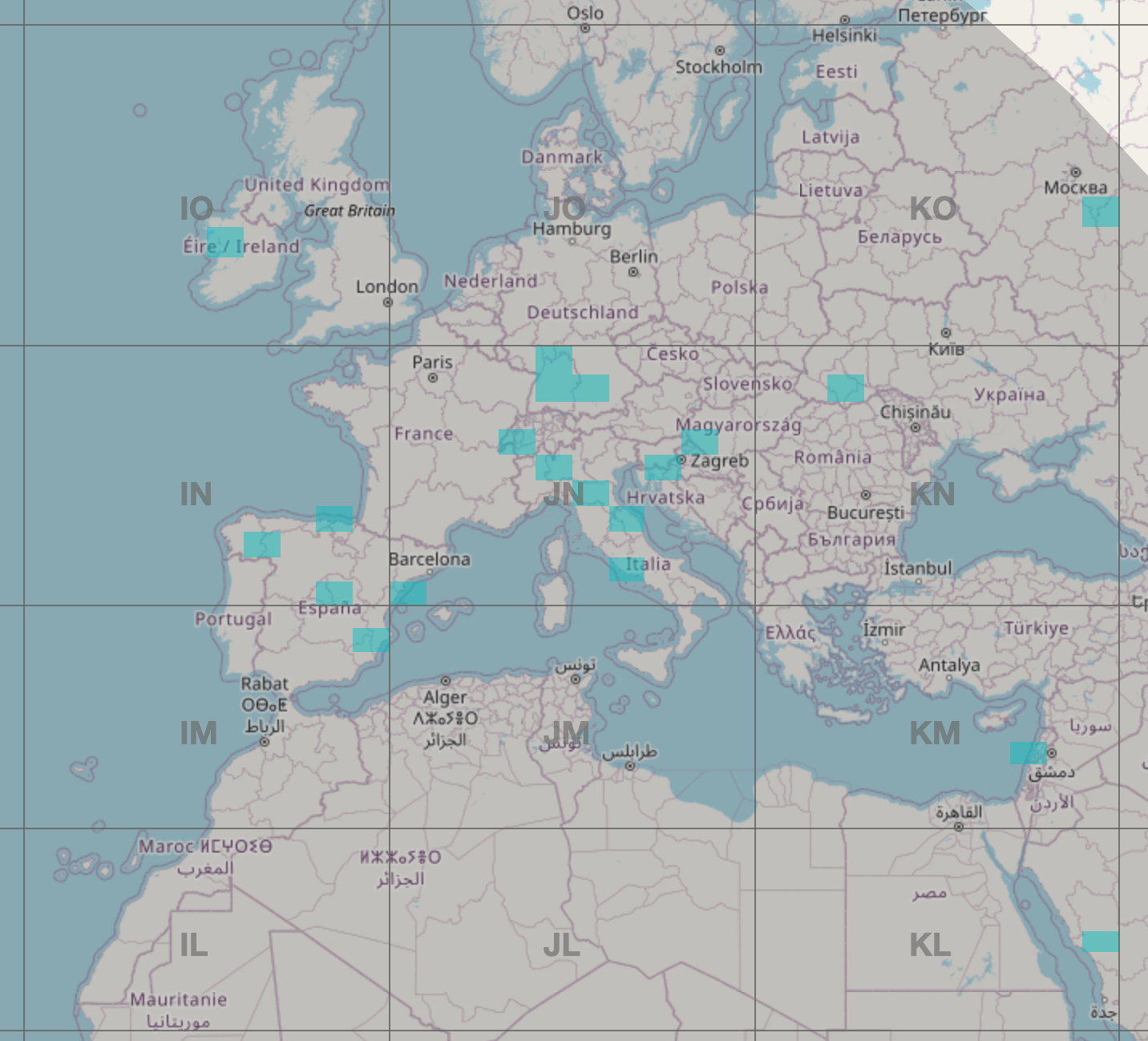
Digital modes are really powerful and efficient, as they can compress information and include checksums to ensure accurate reception. One of the most commonly used across several bands is FT8. On 20m, check out 14.075 MHz using an FT8 decoder like the one included in OpenWebRX+ or WSJT-X. These send extremely minimal information - typically, just someone's call sign, who they are responding to, and a 4-letter Maidenhead grid locator that describes their location on the globe.
FT8 is very resilient - you could practically catch these signals on a fork if you hold it high enough. OpenWebRX+ will even map out signals you receive - I'm able to receive signals from Russia and Saudi Arabia on my noisy random wire. Once, I received a signal from Antarctica, and after triple-checking the call sign, sure enough, it was from a German research station!
Amateur radio - SSTV images
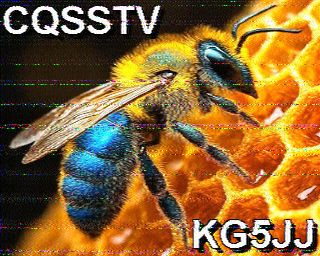
One of my favorite signals to receive is slow-scan TV or SSTV. These are images that take a minute or two to receive. You can find them on 20m at 14.230 MHz, but satellites and the International Space Station will occassionally send them on the VHF bands. Like FT8, these need a program to decode them. The first time I got one of these signals to decode, I let out a scream that can only be described as the noise Lucille Bluth makes on Arrested Development when Gene Parmesan does a reveal. Here's an example of a signal I've received on my antenna, though image quality varies a lot for me based on the noise floor in my apartment.
Time and weather
You can hear the weather on a local frequency on the VHF bands using FM! Check out the NOAA Weather Radio stations for your local frequency. The NIST radio stations send out time information and clicks every second.
Mysterious signals
Not all signals on the waterfall are something meaningful - it could just be your washing machine inducing some currents on your antenna! But figuring out mystery signals can send you down the rabbit hole. For instance, you can check out a very cryptic Russian station called the Buzzer.
What's next?
I suppose the next step is to participate in the conversation. Maybe I'll sit for an amateur radio exam and get licensed one of these days. I don't have the funds for a fancy setup, but hams are creative - a halfway decent transceiver and two Slinkies can transmit a signal even from inside a house.
There's something about the radio that keeps bringing me back. Sure, I have an electrical engineering degree, so something about the signal processing and electronics piques my interest, but there's something more fundamental. These signals are flying around us all the time. Can you tell that someone from Quebec is saying hi to someone in Sonora? There's a picture of a frog someone took on vacation flying by - can you catch it?